


idealista
4.81.21K Reviews
App Specs
- Version
- 15.3.0
- Updated On
- License
- Free
- Downloads
- 10,000,000+
- Developer
- idealista
- Categories
- House & Home
- Platform
- Android, iOS
Screenshots
 Analysis by AppCompare
When I compare property-search apps, the first question I ask is whether I can explore without paying just to get started. idealista is free to download and use as an app, which makes it easy to try for a search in Spain, Italy or Portugal before deciding whether it suits your routine. There are in-app purchases listed at prices from $5.49 to $289.99 per item, so free access and paid options are distinct parts of the picture. I would not treat those purchase prices as a requirement for browsing, nor assume an optional purchase is worthwhile without checking what it offers in the app.
What the free starting point is worth
For me, the useful value of a no-cost starting point is the ability to compare locations and listings before committing time to calls or viewings. You can try a search, adjust the criteria, and see whether the kinds of homes you want appear in the places you are considering. That is especially helpful if you are weighing more than one city or country and are not yet ready to contact an agent.
Paid options deserve a more cautious approach. The listed range is broad, and a price by itself does not explain whether a purchase is relevant to a renter, buyer, or casual browser. I would first use the app for the task I actually have, then consider paying only if a specific option clearly solves a problem I encounter. If the free experience is enough to shortlist places, there is little reason to spend simply because an in-app purchase exists.
What is idealista all about?
Imagine scrolling through a treasure trove of apartments, houses, and even quirky little lofts right at your fingertips. That's idealista for you. It's an app that brings the real estate market to your smartphone, and it's pretty much a go-to for many in Europe. Whether you're buying, renting, or just dreaming, this app has got you covered with a user-friendly interface and a ton of listings.
Getting started with idealista
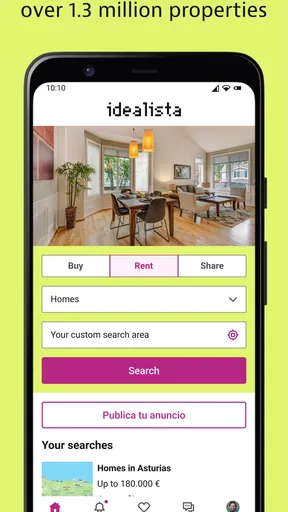
First things first, downloading idealista is a breeze. Available for both Android and iOS, you just hit install and you're ready to roll. Once inside, the app greets you with a clean and intuitive dashboard. It's super easy to navigate, which is a huge plus because who wants to fiddle around when you've got dreams of a cozy new home?
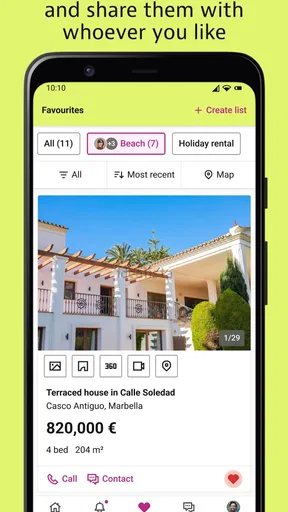
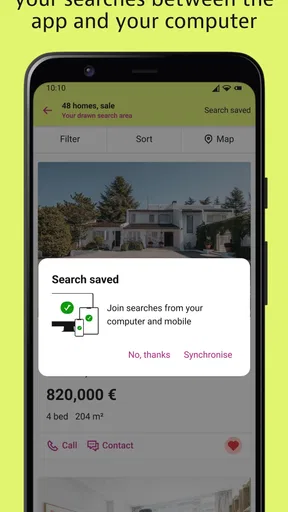
You can search by location, price, size, and even amenities. Want a balcony with a view? No problem! Just set your filters and let idealista do its magic. The best part? You can save your favorite listings and come back to them whenever you need a little property inspiration.
Features that stand out
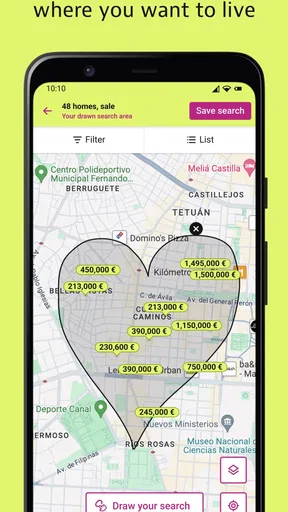
One of the standout features of idealista is its map view. I mean, who doesn't love a good map? It gives you a real sense of where the property is located, and you can see nearby conveniences like shops and public transport. Plus, the app offers detailed descriptions and high-quality photos for each listing. It's like virtually walking through the property without leaving your couch.
Worth Reading Before You Choose

Switching to Android Auto Means Rethinking Your Driving Routine

Google Calendar Makes a Crowded Week Easier to Manage

Baby Panda World Brings Quick Play to Modern Phones, but Its Game Library Feels Busy

ESPN’s Live Game View Makes Following Close Games Easier

QuizzLand Review: A Good Fit for Short Trivia Breaks, Not Every Player

Basketball Stars: Multiplayer Is Fast, but Can It Recover When Matches Go Wrong?
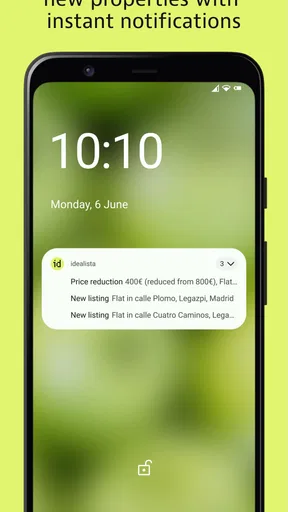
Another cool feature is the "alerts" system. Set your criteria, and the app will notify you when new listings pop up. It's like having a personal real estate assistant in your pocket. And let's be honest, who wouldn't want that?
Making a shortlist that holds up in real life
Saving a listing is most useful when I treat it as a comparison tool, not a promise that the home is still available or right for me. I would keep a small group of candidates and note what each one does better: location, size, or a feature that matters to my household. That makes it easier to spot trade-offs instead of falling for the first attractive set of photos.
For a practical search, I would also keep the filters broad enough to avoid excluding a suitable home for a minor mismatch. If a commute or a particular neighborhood matters more than an extra room, prioritize the location first and compare space afterward. Then widen one filter at a time if results are thin. This simple sequence helps distinguish a genuinely limited market from a search that has become too restrictive.
Alerts work best when the search criteria reflect a real decision rather than a vague wish list. I would set one alert for the essentials and, if useful, keep a separate search for a more flexible option. That way a notification has context: it is either a serious candidate or an interesting compromise. The trade-off is that alerts can encourage constant checking, so I would use them to review new possibilities at a convenient time rather than let every notification interrupt the day.
Using the map to judge the area, not just the pin
The map is valuable because a home is not only its interior. I would use it to compare the position of several listings and check whether the surrounding area appears to fit daily needs, such as reaching public transport or shops. For someone moving to an unfamiliar city, that first geographic check can help narrow the search before arranging a visit.
Still, a map cannot replace seeing the street and building in person. A pin and nearby services do not tell me how noisy a road feels, whether the route is convenient at the time I travel, or what the home is like beyond its listing. I treat the map as a way to form better questions, not as proof that the location will work. Before making a decision, I would verify important details directly with the person offering the property and visit when possible.
A realistic search from first browse to viewing
Imagine I am moving for work and have only a few evenings to look at homes. I would begin with the area I can realistically reach each day, then compare rent or sale options using the filters that matter most. After saving a manageable shortlist, I would map the candidates, remove those that do not fit my route or priorities, and use alerts to catch new listings while I arrange viewings.
That workflow is more useful than endlessly scrolling because each step answers a different question: does the listing meet the basic needs, does its location make sense, and is it worth following up? I would keep a note outside the app of questions to ask about costs, availability, and condition, since attractive photos and a concise description cannot settle those points. The app helps organize discovery; it does not replace due diligence or direct communication.
Where it sits among property-search alternatives
Compared with general classified-ad apps, a dedicated property-search app gives me a more focused way to browse homes and narrow results by housing needs. Compared with visiting an agency or asking locally, it is more convenient for building an initial shortlist across locations, but it cannot provide the same direct, on-the-ground judgment as a viewing or a conversation with a local professional.
That makes idealista a strong starting place rather than a complete decision system. If I were searching in one particular neighborhood and needed highly local guidance, I would pair it with local knowledge and direct checks instead of relying on one app alone. If I were browsing casually, the broad property focus and saved listings would be more useful than the overhead of contacting people immediately. The best alternative depends on whether the main need is discovery, local advice, or confirming a specific home.
Real estate insights
If you're a data geek like me, you'll appreciate the market insights that idealista provides. It offers trends and statistics on property prices, which is super handy if you're trying to gauge the market. Whether you’re a first-time buyer or a seasoned investor, these insights can help you make informed decisions.
I would use those figures as context, not as a verdict on whether a particular asking price is fair. A broad trend cannot account for the condition, exact position, or details of an individual property. For a buyer or renter, the sensible move is to compare similar homes in the same area and then ask about anything that could change the true cost or suitability. For someone thinking about investment, app-based market context can help shape questions, but it is not a substitute for independent research and professional advice where needed.
Who is most likely to get value from it?
I think the app makes the most sense for people actively looking to rent or buy in Spain, Italy, or Portugal, especially if they need to compare several areas or keep track of changing possibilities. It can also suit someone planning a move who wants to explore before travelling, or a curious browser who enjoys seeing what different homes and neighborhoods look like. Its focus is practical: it helps turn a broad search into a set of candidates worth examining.
It is less suitable if you expect an app to verify a listing, negotiate on your behalf, or tell you whether a home is structurally sound. Those decisions require information and checks beyond browsing. I would also look elsewhere or add another source if my search depended on local advice in a very specific area, or if I needed certainty about a listing before making plans. A listing platform can make discovery easier, but the responsibility to confirm details remains with the person searching.
What to expect before installing
The app is developed by idealista and sits in the House & Home category. It has a 4.8 average from around 440,000 ratings, with more than 10 million installs, which suggests it is widely used by people looking for property. It is free, rated for Everyone, and the current version is 14.3.3, with Android 8.0 or later required. Those details make it accessible to many users, though the purchase options are worth keeping in mind if you prefer to avoid optional spending altogether.
For anyone wondering whether it is useful outside a full relocation, I would say yes if you have a concrete comparison to make: perhaps checking the range of homes in two areas or seeing how your needs translate into available listings. For a person with no interest in property, it offers little reason to stay installed. And if you are already committed to a particular home, the app is more useful for reference and alternatives than as a replacement for confirming the arrangement directly.
Community and support
What really makes idealista shine is its community feel. Users can leave reviews and ratings, giving you a real sense of what to expect. And if you ever hit a snag, their customer support is pretty responsive. It feels like they genuinely care about helping you find your perfect place.
In practice, I would separate feedback about using the app from evidence about a property. Ratings can help me understand other users’ experiences with the service, but they should not be treated as a guarantee about a home or the person listing it. If something is unclear or a search does not behave as expected, support can be a useful route for an app-related issue; property-specific questions still belong with the relevant contact.
Final thoughts
In a nutshell, idealista is a must-have app for anyone in the property market or those who just love exploring new places. It's packed with features that make property hunting a breeze, and its user-friendly design is just the cherry on top. So, whether you're looking to buy, rent, or just dream a little, give idealista a whirl. You might just find your next home sweet home.
My verdict is positive, with one important qualification: I would recommend it as a free place to begin a property search, not as the final authority on a listing or a reason to buy an optional item without a clear need. Its combination of filters, saved homes, map browsing, alerts, and market context can make the early stages more organized. The strongest value is for someone comparing real options across the three countries it serves; a casual browser can enjoy it too, but may not need to keep it installed.
If you are deciding whether to try it, I would start with one realistic search and see whether the results help you make a shortlist. Keep the criteria focused, check the map with your routine in mind, and confirm important details directly before acting. If that process saves time or helps you notice a viable area you had overlooked, the free app has done its job. If you need verified property condition, tailored local advice, or a guaranteed answer about an individual listing, pair it with the appropriate real-world checks rather than expecting the app to do everything.
Pros
- User-friendly interface
- easy navigation.
- Comprehensive property search filters.
- Regularly updated property listings.
- Detailed property descriptions and photos.
- Includes rental and purchase options.
Cons
- Some listings may lack updated photos.
- Occasional lag in loading times.
- Limited support for smaller towns.
- In-app ads can be intrusive.
- No built-in mortgage calculator.
FAQs for idealista
What is idealista and what features does it offer?
Idealista is a real estate app designed to help users find their ideal home or property. It offers features such as advanced search filters, detailed property listings with photos and descriptions, and interactive maps to explore neighborhoods. Users can also save their favorite properties and receive notifications about new listings.
Is idealista available in multiple languages and regions?
Yes, idealista is available in several languages, making it accessible to a broad audience. It covers multiple regions, primarily focusing on European markets like Spain, Italy, and Portugal. This localization ensures that users can search for properties in their preferred language and region-specific listings.
How does idealista ensure the accuracy of its property listings?
Idealista works closely with real estate agents, agencies, and private sellers to ensure the accuracy of its listings. The platform encourages users to report any discrepancies, and regularly updates its database to reflect the most current information. This helps maintain a reliable and trustworthy resource for property hunters.
Can users contact property owners or agents directly through idealista?
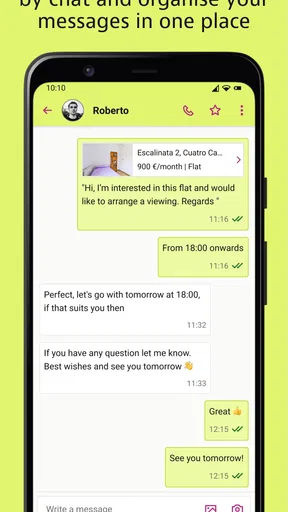
Yes, idealista facilitates direct communication between users and property owners or agents. Each property listing includes contact information or a messaging feature, allowing users to make inquiries, schedule viewings, or negotiate terms directly through the app. This streamlines the process of finding and securing a property.
Is idealista free to use, and are there any premium features?
Idealista is free to download and use, offering a wide range of features at no cost. However, it also offers premium features for users who want enhanced functionalities, such as priority visibility for their listings or advanced analytics. These premium options are available through in-app purchases or subscriptions.


